The right GPS cycling computer eliminates the split-trail panic entirely — because it shows you the turn before you miss it, not after. The five units below cover every rider from the casual e-biker who wants simple navigation to the all-day gravel rider who needs 35+ hours of battery and multi-band GNSS accuracy.
| Photo |
Top Pick

|
Versatile
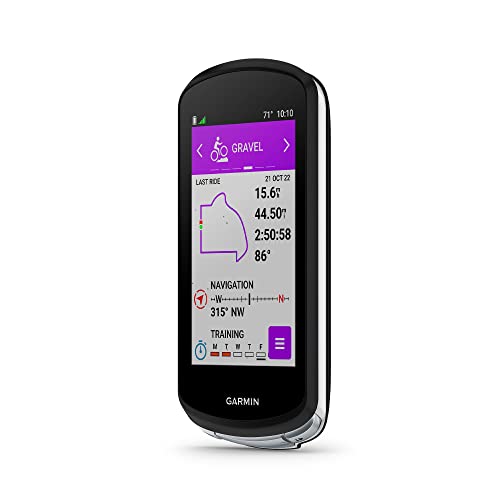
|
Budget

|
Best Value

|
Best for Reliability

|
|---|---|---|---|---|---|
| Product | Garmin Edge 840 GPS Cycling Computer | Garmin Edge 1040 GPS Bike Computer | Wahoo ELEMNT Bolt V2 GPS Cycling Computer | Garmin Edge Explore 2 GPS Cycling Navigator | Garmin Edge 540 GPS Cycling Computer |
| Gnss | Multi-band | Multi-band | Standard GPS + GLONASS | Standard GPS | Multi-band |
| Screen | 2.6" touchscreen + buttons | 3.5" touchscreen | 2.2" color display | 3" touchscreen | 2.6" display (buttons only) |
| Map storage | ✓ | ✓ | Yes (16GB) | ✓ | ✓ |
| Battery life | 26 hrs (demanding) | 35 hrs (demanding) | 15 hrs (demanding) | 16 hrs (demanding) | 26 hrs (demanding) |
| Buy Now | Check Price → | Check Price → | Check Price → | Check Price → | Check Price → |
Quick Tips
Download offline maps before you leave — streaming routes mid-ride drains your phone and fails in dead zones where you need navigation most.Mount your computer at eye level using an out-front mount so you can read turn prompts without looking down at your stem.Plan routes in the companion app the night before rather than building them on-device — it's faster and you can verify the full path before rolling out.Charge to 100% the morning of a long ride, not the night before — cycling computers discharge slowly in standby but a full charge buys you the most margin.
Garmin Edge 840 GPS Cycling Computer
Best for riders who want navigation and training in one unit
Garmin Edge 840 GPS Cycling Computer
Best for riders who want navigation and training in one unit
What we like
- Combines full touchscreen navigation with physical buttons that work in rain or gloves — you're never stuck fumbling mid-ride.
- Multi-band GNSS delivers accurate positioning even under dense tree cover on gravel and forest trails where single-band units drift.
- ClimbPro ascent planner activates automatically on every ride without needing a pre-loaded course — shows remaining climb and grade in real time.
- Syncs routes wirelessly from Strava, Komoot, and Garmin Connect — no cable required to get new rides onto the device.
What we don't
- Adaptive coaching features require a compatible power meter and heart rate monitor to unlock, which adds cost on top of an already premium price.
- The 2.6" screen is smaller than the Garmin Edge 1040's 3.5" display, which makes map reading slightly harder at a glance on complex routes.
- Setup through the Garmin Connect app can feel clunky compared to Wahoo's companion app experience.
The Edge 840 is the unit you reach for when you want real navigation — actual turn-by-turn prompts ahead of the turn, not a map you have to decode while moving — without giving up the training metrics that make a GPS computer worth owning year-round. This is the right pick if you ride a mix of road, gravel, and trail and want one device that handles all of it.
Skip it if you only want navigation and have no interest in performance tracking — the Explore 2 does the navigation job for $150 less.
Garmin Edge 1040 GPS Bike Computer
Best for ultra-distance and multi-day riders
Garmin Edge 1040 GPS Bike Computer
Best for ultra-distance and multi-day riders
What we like
- 35-hour battery life in demanding mode is the longest in its class for non-solar units — enough for a full brevet or two-day touring stage without a recharge.
- The 3.5" display is large enough to read map detail, elevation profiles, and upcoming turns at a glance without slowing down.
- Trailforks integration and off-course recalculation make it the strongest off-road navigation unit Garmin currently makes.
- VO2 max, heat and altitude acclimation, and stamina insights are built in and accurate without requiring premium add-on subscriptions.
What we don't
- At roughly $550, it is the most expensive unit in this guide and the premium over the Edge 840 is hard to justify for riders under 6-hour rides.
- Larger physical footprint means it's noticeably bulkier on the bar — fine for road bikes but can feel oversized on compact gravel or mountain bike cockpits.
- The training interface is complex enough that new users typically need a few rides to understand what all the data fields mean.
If your rides routinely run 8 hours or more — bikepacking, randonneuring, multi-day touring — the Edge 1040's battery headroom changes your planning completely. You stop thinking about charge stops and start thinking about the route.
This is specifically for the rider who has outgrown shorter battery units, not for someone doing 2-3 hour weekend rides. At that distance, the Edge 840 does the same navigation job for $150 less.
Wahoo ELEMNT Bolt V2 GPS Cycling Computer
Best for riders who hate fiddling with settings
Wahoo ELEMNT Bolt V2 GPS Cycling Computer
Best for riders who hate fiddling with settings
What we like
- The ELEMNT companion app is significantly easier to set up than Garmin Connect — first ride setup takes under 10 minutes from box to moving.
- Auto-downloads routes from Strava, Komoot, and Ride with GPS overnight so your saved rides appear on-device without any manual syncing.
- 16GB of internal storage holds detailed maps for large regions, reducing the need to pre-plan which map tiles you download.
- Physical buttons work reliably in wet gloves and cold weather without false touches — a real advantage on rainy commutes and early-morning starts.
What we don't
- 15-hour battery life is the shortest in this guide — not suitable for all-day rides without planning a mid-route charge stop.
- No touchscreen means map panning and zooming requires more button presses than on the Edge 840 or Explore 2.
- Training metrics are less detailed than Garmin's equivalent tier — no adaptive coaching and limited power meter integration compared to the Edge 540 at a similar price.
The Bolt V2 wins on setup simplicity and route syncing. If you've ever wasted 45 minutes trying to get a GPX file onto a Garmin before a ride, Wahoo's automatic download system feels like a different product category entirely.
This is the right pick for a commuter or weekend rider who imports routes from Strava and wants a reliable computer that disappears into the background. It's not the right pick for multi-day trips where battery life is critical.
Garmin Edge Explore 2 GPS Cycling Navigator
Best for casual riders and e-bike users who want simple navigation
Garmin Edge Explore 2 GPS Cycling Navigator
Best for casual riders and e-bike users who want simple navigation
What we like
- The largest screen in its price tier at 3 inches — easier to read turn prompts and map detail than the Bolt V2 or Edge 540 without paying Edge 840 prices.
- Native e-bike integration shows remaining range and adjusts routing suggestions based on battery level — the only unit in this guide with that feature.
- Glove-friendly touchscreen is rated for rain and works with winter gloves, solving the cold-weather usability problem without button-only compromises.
- Incident detection and GroupTrack features are built in and work without additional sensors — useful for solo riders on unfamiliar roads.
What we don't
- No training metrics — no power analysis, no VO2 max, no coaching — so it's a pure navigation device for riders who don't train with data.
- Standard GPS (not multi-band) means accuracy can degrade under heavy tree cover compared to the Edge 840 or Edge 540.
- 16-hour battery is adequate for day rides but not comfortable margin for anything over 10 hours.
The Explore 2 is the right GPS computer if navigation is the entire job and training data is irrelevant to how you ride. The 3-inch touchscreen at this price point is genuinely good — better for glancing at a map than the smaller screens on pricier performance-focused units.
E-bike riders should strongly consider this over anything else in the guide: no other unit here integrates with your bike's battery status to adjust routing in real time. Skip it if you ride for training data or regularly go under heavy tree cover where multi-band GPS makes a real difference.
Garmin Edge 540 GPS Cycling Computer
Best for performance riders who prefer button controls
Garmin Edge 540 GPS Cycling Computer
Best for performance riders who prefer button controls
What we like
- Multi-band GNSS at a lower price than the Edge 840 — you get the same positioning accuracy under tree cover for roughly $80 less.
- 26-hour battery life in demanding mode matches the Edge 840, making it a strong option for full-day gravel rides without mid-route charging.
- Button-only controls are preferred by many riders in cold and wet conditions where touchscreens become unreliable — this is a feature, not a downgrade.
- Full adaptive coaching, ClimbPro, and stamina insights are identical to the Edge 840 — the only difference is the lack of touchscreen.
What we don't
- Button-only navigation requires more button presses to pan or zoom the map versus the touchscreen on the Edge 840 — slower to reorient mid-ride.
- No touchscreen means the interface feels slower to newer users who are accustomed to swiping through menus.
- Display is not as vivid as the Edge 840's higher-contrast screen, which can make map details harder to read in bright direct sunlight.
The Edge 540 is what you choose when you want everything the Edge 840 does — multi-band GNSS, long battery, full performance coaching, real maps — but you either prefer buttons or want to save $80. This is genuinely the better pick for riders in wet climates or those who regularly wear winter gloves.
The touchscreen on the 840 is good; the buttons on the 540 are more reliable in the specific conditions where navigation matters most.
What to Look For
On-device map storage is the single most important spec for navigation. A computer that streams maps from your phone will fail you the moment you enter a dead zone — which is exactly where you need navigation most.
Battery life in 'demanding use' mode (with GPS and backlight on) is the number that matters. Manufacturer ratings in battery-saver mode sound impressive but aren't realistic for an active riding session.
Turn-by-turn prompt quality varies significantly between units. The best computers alert you well ahead of a turn with both a visual cue on-screen and an audible beep — units that only show a map require you to glance down and interpret it yourself.
Who Should Skip This
If you ride the same three local loops and already know every turn by memory, a dedicated GPS cycling computer is hard to justify — your phone mounted to your bars will do the job. These units earn their cost on unfamiliar routes, long-distance rides, or any situation where phone battery life and cellular dead zones become a real problem.
What the Community Actually Uses
On r/cycling, the recurring advice for navigation-focused buyers is to prioritize map storage and turn-by-turn quality over training metrics. The community consistently points out that units marketed as 'performance computers' often treat navigation as secondary — and that the Explore 2 is repeatedly recommended for riders who want navigation without paying for coaching features they'll never use.
Quick Picks — In Case You've Already Decided
Frequently Asked Questions
Do I need a cycling computer if I have a phone mount?
Not always, but a dedicated unit outlasts your phone's battery significantly, survives rain better, and doesn't drain when you get a call mid-ride. For routes under 2 hours in familiar areas, a phone mount works fine. Beyond that, a dedicated computer pays for itself in reliability.
What is multi-band GNSS and why does it matter for cycling?
Multi-band GNSS uses multiple satellite frequencies simultaneously, which gives significantly better accuracy under tree canopy, in urban canyons, and on winding gravel trails. Single-band GPS can drift or lose signal in those conditions, which causes your computer to misplace you on the map mid-route.
Can I load my own routes from Strava or Komoot?
Yes — every unit in this guide accepts GPX files and syncs routes from Strava, Komoot, and Ride with GPS. The Wahoo ELEMNT Bolt V2 auto-downloads your saved routes wirelessly when connected to those accounts, so they're already on the device when you head out.
Is touchscreen or button control better for navigation?
Buttons are more reliable in rain and cold because they work with wet gloves. Touchscreen is faster for panning maps and tapping through menus when conditions are good. The Garmin Edge 840 gives you both on one unit, which is the best of both worlds.
How long does GPS cycling computer battery actually last on a ride?
Expect roughly 70–80% of the manufacturer's 'demanding use' rating in real conditions with backlight, GPS, and Bluetooth active. The Garmin Edge 1040 rates 35 hours demanding — budget for 25–28 hours real-world. The Garmin Edge Explore 2's 16-hour rating realistically delivers 12–14 hours.
Buying Guide
You need a unit that stores maps on-device, not one that streams them from your phone. Look for turn-by-turn prompts, multi-band GNSS for accuracy under tree cover, and at least 16 hours of battery in demanding mode.
Touchscreen is nice; button controls survive rain and gloves better. Match the unit to how far you actually ride.